Features FAQ GitHub Docs
Get Started

A calmer way to
manage Dokku

Pruvon gives your Dokku server a clean, intuitive web interface — without replacing the power of the command line.

Read the Docs View on GitHub
AGPLv3 Licensed · Self-hosted · No telemetry · GitHub OAuth · Works with your existing Dokku
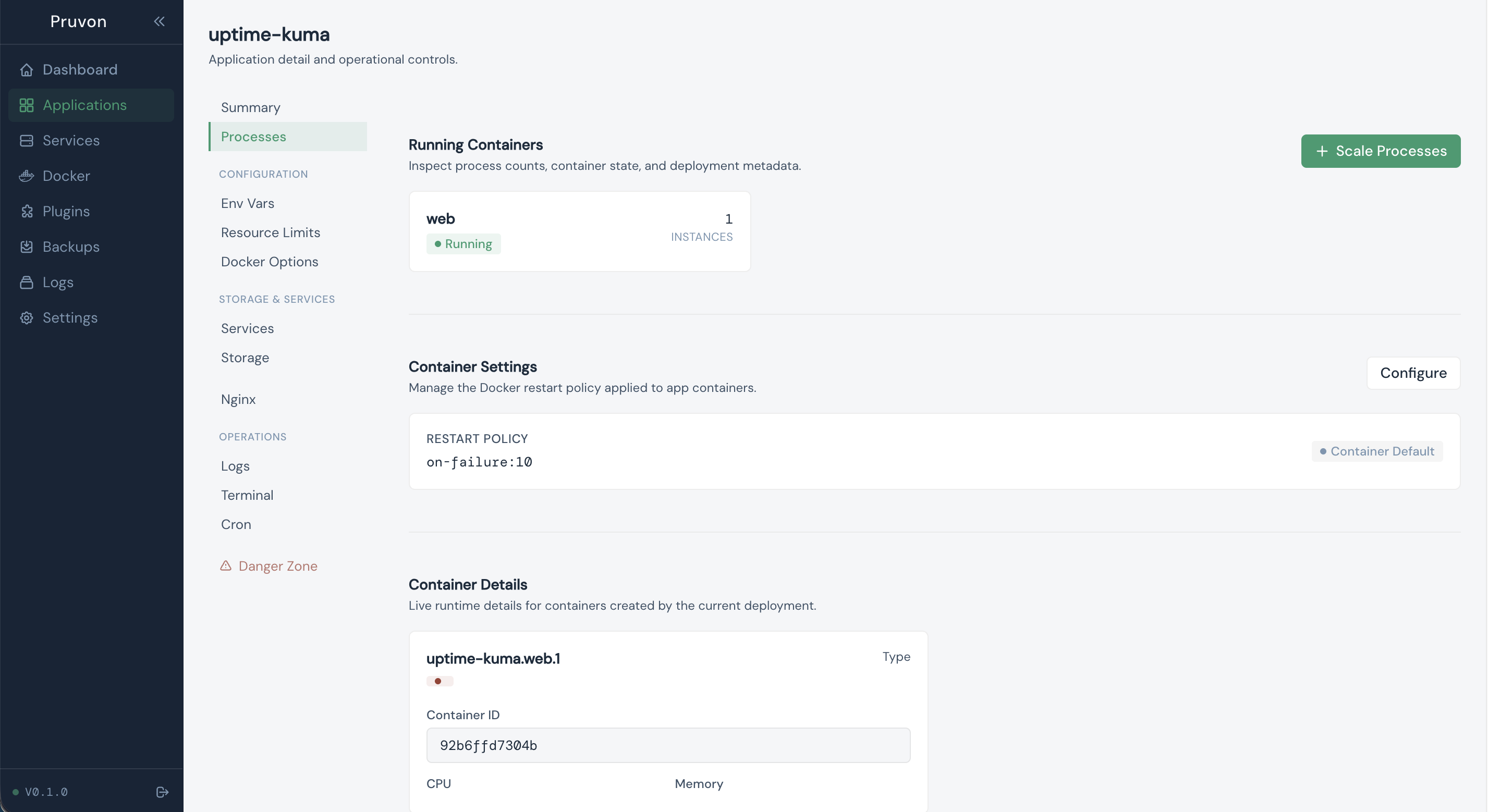
Apps · Services · Logs · Domains & SSL · Terminal · Team Access

Free and open source, forever

AGPLv3 licensed. Self-host it on your own infrastructure, modify it, contribute it back. If you run a modified version publicly, you must publish the source code.

Features

Everything you need,
nothing you don't

Pruvon covers the core Dokku workflows — apps, services, logs, deployments — in one consistent interface. No new abstractions, no vendor lock-in.

App Management

Restart, scale, and rebuild apps from a single view. Manage environment variables, port mappings, and deployment config without SSHing into the server.

Service Management

Provision and link Postgres, MariaDB, Redis, and MongoDB instances. Trigger backups, inspect connection strings, and monitor service status in one place.

Live Logs

Stream application logs in real time directly in the browser. No SSH, no tail commands — persistent log view that stays open across page reloads.

Terminal Access

Full PTY-based terminal for any app container, running in the browser via xterm.js. Useful for quick debugging without leaving the dashboard.

SSL & Domains

Issue and renew Let's Encrypt certificates, manage domain mappings, and inspect nginx routing — without editing config files directly.

Team Access

Invite team members via GitHub OAuth. Assign per-app permissions so each person can only see and operate what they're responsible for.

Why Pruvon

Dokku CLI vs Pruvon

The CLI isn't going anywhere. Pruvon adds visibility, faster feedback, and easier team access on top of it.

With Pruvon

  • All apps and services visible in one view — status, uptime, resource usage
  • Restart, rebuild, or roll back an app without opening a terminal
  • Log stream always open in the browser — no reconnecting after disconnect
  • Team members get scoped access without sharing server credentials
  • SSL certificates issued and renewed from the UI

Dokku CLI only

  • State visible only through individual commands — no aggregate view
  • Every operation requires SSH access to the host
  • Logs tailed manually; session ends when the terminal closes
  • Sharing access means distributing SSH keys or creating system users
  • Certificates configured via certbot; nginx edited by hand

Up and running
in 60 seconds

A single shell script installs Pruvon as a systemd service. No Docker, no additional dependencies, no configuration files to create.

Your existing Dokku setup stays untouched.

Requirements
Linux (Ubuntu / Debian)  ·  systemd  ·  existing Dokku installation
$ PORT=8080 curl -s https://pruvon.dev/install.sh | bash
Downloading Pruvon...
Installing to /usr/local/bin/pruvon
Creating systemd service...
Starting pruvon.service
✓ Pruvon is running at http://localhost:8080
FAQ

Frequently asked
questions

Everything you need to know before getting started.

Yes. Pruvon installs as a separate systemd service and reads your existing Dokku configuration. It does not modify or replace your Dokku installation — it simply provides a web interface on top of it.

Pruvon supports Dokku 0.30 and above. We recommend running the latest stable Dokku release for the best compatibility and access to all features.

You need a Linux server (Ubuntu or Debian) with systemd and an existing Dokku installation. Pruvon itself is lightweight and runs as a single binary with minimal resource usage.

Yes, Pruvon is AGPLv3 licensed and completely free. There are no usage limits, no premium tiers, and no telemetry. You can self-host it on your own infrastructure. If you modify and publicly run the software, you must share the source code under the AGPLv3 terms.

Team members authenticate via GitHub OAuth. You can assign per-app permissions so each person only sees and can operate on the apps they're responsible for. No need to share SSH keys or server credentials.

Absolutely. Pruvon is a read/write interface to your Dokku server — it doesn't store any app data itself. Uninstalling Pruvon removes only the web interface. Your Dokku apps, services, and configurations remain untouched.

Open an issue on our GitHub repository. We welcome bug reports, feature requests, and contributions from the community.

Ready to try it
on your own server?

Start with the documentation or review the source. One install command, no cloud required.

Read Documentation Browse Source